

 IND
IND UAE
UAE SA
SA
How to Rent NVIDIA B300 GPU Servers: A Complete Guide
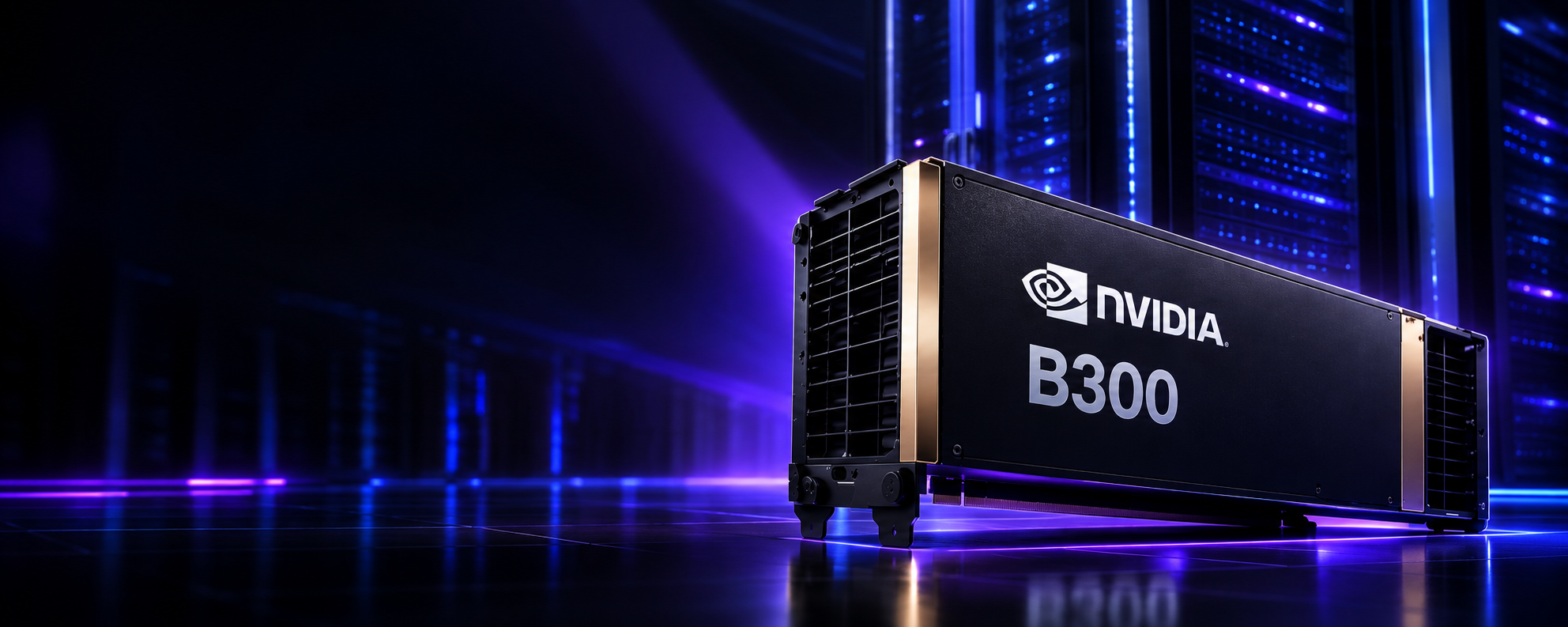
Artificial Intelligence (AI) is evolving rapidly, and organizations require increasingly powerful computing resources to train, fine-tune, and deploy advanced AI models. The NVIDIA B300 GPU, built on NVIDIA's latest Blackwell architecture, is designed to deliver exceptional performance for generative AI, large language models (LLMs), machine learning, deep learning, scientific computing, and high-performance computing (HPC).
However, purchasing enterprise-grade GPU infrastructure can require a significant capital investment. That's why many businesses are choosing to rent NVIDIA B300 GPU servers instead of buying them outright.
In this guide, you'll learn everything you need to know about renting NVIDIA B300 GPU servers, including benefits, selection criteria, pricing considerations, and why Cyfuture AI is a trusted GPU cloud provider.
What is an NVIDIA B300 GPU Server?
The NVIDIA B300 GPU is NVIDIA's next-generation AI accelerator designed to support the most demanding AI workloads. It offers significant improvements in:
- AI model training
- Large Language Models (LLMs)
- AI inference
- Multi-modal AI
- HPC simulations
- Data analytics
- Scientific research
B300 servers are built for enterprises that require high-speed computation, enormous memory bandwidth, and efficient scaling across multiple GPUs.
Why Rent Instead of Buy?
Buying enterprise GPU servers involves:
- High upfront investment
- Infrastructure costs
- Power and cooling expenses
- Hardware maintenance
- Long procurement cycles
Renting eliminates these challenges.
Benefits of Renting NVIDIA B300 GPU Servers
1. No Capital Investment
Pay only for the GPU resources you use without purchasing expensive hardware.
2. Instant Deployment
Provision GPU servers within minutes instead of waiting weeks for hardware delivery.
3. Flexible Scaling
Increase or decrease GPU capacity as project requirements change.
4. Latest Hardware
Access the newest NVIDIA GPU technology without worrying about hardware upgrades.
5. Lower Operating Costs
The provider manages maintenance, networking, storage, cooling, and infrastructure.
Who Should Rent NVIDIA B300 GPU Servers?
B300 GPU servers are ideal for:
- AI startups
- Research institutions
- Universities
- Enterprise AI teams
- Healthcare organizations
- Financial institutions
- Manufacturing companies
- Media and entertainment firms
- Autonomous vehicle developers
- Robotics companies
Workloads Best Suited for NVIDIA B300 GPUs
The NVIDIA B300 is designed for compute-intensive applications, including:
- Large Language Model (LLM) training
- Fine-tuning foundation models
- AI inference
- Stable Diffusion
- Video generation AI
- Computer vision
- Natural Language Processing
- Reinforcement learning
- Scientific simulations
- Digital twins
- Drug discovery
- Financial modeling
- 3D rendering
- HPC workloads
How to Rent NVIDIA B300 GPU Servers
Step 1: Define Your AI Requirements
Start by identifying:
- AI model size
- Training or inference workload
- Number of GPUs needed
- Storage requirements
- Network bandwidth
- Expected runtime
- Required software frameworks
Understanding your workload helps you choose the right server configuration.
Step 2: Choose the Right GPU Configuration
GPU providers typically offer:
- Single GPU servers
- Multi-GPU servers
- Dedicated GPU clusters
- Kubernetes-ready GPU nodes
- High-memory AI instances
Choose a configuration based on your workload and scalability needs.
Step 3: Select a Reliable GPU Cloud Provider
When comparing providers, consider:
- GPU availability
- Performance
- Uptime guarantees
- Security certifications
- Technical support
- Pricing transparency
- Scalability
- Data center locations
A reliable provider ensures consistent performance and minimal downtime.
Step 4: Choose Your Rental Model
Most providers offer flexible pricing models such as:
- Hourly billing
- Daily rental
- Weekly plans
- Monthly subscriptions
- Reserved GPU instances
Select the option that best matches your project's duration and budget.
Step 5: Configure Your Environment
Before launching your instance, choose:
- Operating system
- CUDA version
- NVIDIA drivers
- Docker support
- Kubernetes integration
- Python environment
- AI frameworks such as TensorFlow or PyTorch
Many providers offer pre-configured AI environments to simplify deployment.
Step 6: Deploy Your GPU Server
Once configured, your server is typically ready within minutes. You can:
- Upload datasets
- Connect via SSH
- Install applications
- Start training AI models
- Run inference workloads
- Monitor GPU performance
Features to Look for in a GPU Cloud Provider
When renting NVIDIA B300 GPU servers, prioritize providers that offer:
- Latest NVIDIA GPUs
- Dedicated GPU instances
- NVMe SSD storage
- High-speed networking
- 24/7 technical support
- Automated backups
- GPU monitoring dashboards
- Enterprise-grade security
- API access
- Flexible scaling
Why Choose Cyfuture AI for NVIDIA B300 GPU Servers?
Cyfuture AI provides enterprise-grade GPU cloud infrastructure tailored for AI development and deployment.
Key Advantages
- NVIDIA B300 GPU Cloud Servers
- High-performance AI infrastructure
- Flexible hourly and monthly billing
- Dedicated GPU instances
- Fast deployment
- Secure Tier III/IV data centers
- High-speed networking
- AI-ready software stack
- Scalable GPU clusters
- 24×7 expert support
- Enterprise security and compliance
Whether you're training foundation models or deploying AI applications, Cyfuture AI offers the performance and flexibility required for modern AI workloads.
Best Practices for Renting GPU Servers
To maximize performance and cost efficiency:
- Estimate GPU usage before renting.
- Use spot or reserved instances for long-running jobs if available.
- Optimize AI code for GPU utilization.
- Monitor GPU performance regularly.
- Store datasets on high-speed storage.
- Shut down idle instances to reduce costs.
- Choose providers with transparent pricing.
Common Mistakes to Avoid
Avoid these pitfalls when renting GPU servers:
- Overestimating GPU requirements
- Ignoring storage and bandwidth needs
- Choosing providers without SLA guarantees
- Not considering scalability
- Failing to monitor resource usage
- Overlooking security and compliance
Future of NVIDIA B300 GPU Cloud
As AI models continue to grow in size and complexity, demand for high-performance GPU cloud infrastructure will rise. Renting NVIDIA B300 GPU servers allows organizations to adopt cutting-edge AI technology without the burden of owning and maintaining expensive hardware.
Cloud-based GPU solutions also enable faster experimentation, shorter development cycles, and improved return on investment.
Conclusion
Renting NVIDIA B300 GPU servers is an efficient and cost-effective way to access powerful AI computing resources. Whether you're building large language models, running AI inference, or performing HPC simulations, renting provides the flexibility, scalability, and performance needed to accelerate innovation.
By partnering with a trusted provider like Cyfuture AI, businesses can quickly deploy enterprise-grade GPU infrastructure, optimize costs, and focus on developing AI solutions rather than managing hardware.
Frequently Asked Questions (FAQs)
1. Why should I rent NVIDIA B300 GPU servers instead of buying them?
Renting eliminates high upfront costs, offers flexible pricing, enables quick deployment, and provides access to the latest GPU technology without maintenance responsibilities.
2. What workloads are NVIDIA B300 GPU servers best suited for?
They are ideal for AI model training, large language models (LLMs), generative AI, machine learning, deep learning, computer vision, scientific computing, and high-performance computing (HPC).
3. Can I scale my GPU resources as my project grows?
Yes. Most GPU cloud providers, including Cyfuture AI, allow you to scale GPU instances up or down based on your workload requirements.
4. Does Cyfuture AI provide dedicated NVIDIA B300 GPU servers?
Yes. Cyfuture AI offers dedicated NVIDIA B300 GPU cloud servers with enterprise-grade infrastructure, high-speed networking, secure data centers, and flexible billing options.
5. What should I consider before renting a B300 GPU server?
Evaluate your AI workload, required GPU count, storage capacity, networking needs, software compatibility, pricing model, security, and the provider's support and SLA.