

 IND
IND UAE
UAE SA
SA


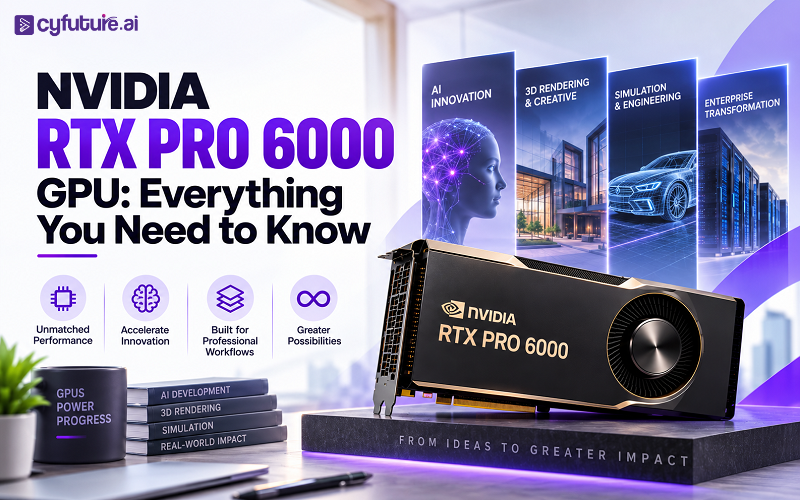
What Is the NVIDIA RTX PRO 6000 GPU?
The boundary between AI compute, professional visualization, and scientific simulation has effectively dissolved. The same GPU that renders a photorealistic product scene in the afternoon may spend the night running a fine-tuning job on a domain-specific language model. That overlap isn't accidental — it reflects how AI has embedded itself into engineering, research, design, and media workflows simultaneously. The result is a class of professional GPU that needs to handle all of it without compromise.
The NVIDIA RTX PRO 6000 GPU is NVIDIA's answer to that requirement for the Blackwell generation. Available in three distinct editions — Workstation, Server, and Max-Q Workstation — the RTX PRO 6000 Blackwell family pairs 96 GB of GDDR7 ECC memory with fifth-generation Tensor Cores, fourth-generation RT Cores, and PCIe Gen 5 connectivity. It supersedes the RTX 6000 Ada Generation and brings Blackwell's AI acceleration capabilities to professional GPU deployments across workstations and data center rack servers.
In brief: The NVIDIA RTX PRO 6000 Blackwell is a professional GPU with 96 GB GDDR7 ECC memory, fifth-generation Tensor Cores supporting FP4 and FP8 precision, fourth-generation RT Cores, PCIe Gen 5 connectivity, and NVENC/NVDEC media engines. It is available as a high-power Workstation Edition (active cooling), a passive-cooled Server Edition for rack deployment, and a lower-TDP Max-Q Workstation Edition for multi-GPU dense configurations.

NVIDIA Blackwell Architecture: What It Means for the RTX PRO 6000
NVIDIA's Blackwell architecture represents a meaningful generational step beyond Ada Lovelace, particularly for AI workloads. For the data center lineup — the B100, B200, and B300 — Blackwell introduced a dual-reticle die design with a 10 TB/s on-package interface. The RTX PRO 6000, however, is a single-die professional GPU. It carries Blackwell's core architectural advances without the die-bridging complexity of the HGX server parts.
The most consequential change from Ada Lovelace is the introduction of fifth-generation Tensor Cores. Ada's fourth-generation Tensor Cores supported FP8 as their most aggressive precision mode. Blackwell's fifth-generation adds native FP4 support (NVFP4) — delivering approximately 2× the AI throughput of FP8 for inference workloads on quantized models without a meaningful accuracy penalty on modern transformer architectures.
For rendering, fourth-generation RT Cores handle hardware-accelerated ray traversal and triangle intersection at higher throughput than Ada's third-generation RT Cores, directly benefiting path tracing, global illumination, and real-time ray-traced rendering pipelines.
NVIDIA RTX PRO 6000 GPU — Full Technical Specifications
The RTX PRO 6000 Blackwell exists in three distinct configurations. Specifications below are based on official NVIDIA product page data as of August 2026. Where values differ between editions, each edition is labeled explicitly.
| Specification | Workstation Edition | Server Edition | Max-Q Workstation Edition |
|---|---|---|---|
| Architecture | NVIDIA Blackwell | NVIDIA Blackwell | NVIDIA Blackwell |
| GPU Memory | 96 GB GDDR7 ECC | 96 GB GDDR7 ECC | 96 GB GDDR7 ECC |
| Memory Interface | 384-bit | 384-bit | 384-bit |
| Tensor Core Generation | 5th Gen (FP4 / FP8 / FP16 / BF16 / TF32) | 5th Gen | 5th Gen |
| RT Core Generation | 4th Gen | 4th Gen | 4th Gen |
| ECC Memory | Yes (Full ECC) | Yes (Full ECC) | Yes (Full ECC) |
| PCIe Interface | PCIe Gen 5 ×16 | PCIe Gen 5 ×16 | PCIe Gen 5 ×16 |
| Board Power (TDP) | Up to 600 W | Configurable (passive) | Lower TDP (multi-GPU optimised) |
| Cooling Solution | Active (double-flow-through) | Passive | Active (low-profile / compact) |
| Form Factor | 4.4-slot dual-slot wide workstation | Full-height, full-length (FHFL) for rack | Compact for multi-GPU workstation bays |
| Display Outputs | 4× DisplayPort 2.1 | Not applicable (headless) | 4× DisplayPort 2.1 |
| NVENC | 2× (10th Gen, AV1) | 2× (10th Gen, AV1) | 2× (10th Gen, AV1) |
| NVDEC | 2× | 2× | 2× |
| NVLink Support | NVLink Bridge (2-GPU) | PCIe-based multi-GPU | NVLink Bridge (2-GPU) |
| Operating System | Windows / Linux | Linux | Windows / Linux |
| CUDA / Compute | CUDA 12.x, compute capability 10.0 | CUDA 12.x, compute capability 10.0 | CUDA 12.x, compute capability 10.0 |
| Ideal Environment | High-performance AI workstation | Data center rack server | Dense multi-GPU workstation |
CUDA core counts and precise memory bandwidth figures for the RTX PRO 6000 Blackwell were not listed on NVIDIA's official product pages as of August 2026. Per NVIDIA's published data, the GPU delivers competitive AI and graphics throughput relative to the Ada generation — specific CUDA core counts should be verified against NVIDIA's datasheet once published. Do not rely on third-party aggregator estimates for production procurement decisions.
Understanding the NVIDIA RTX PRO 6000 Blackwell Editions
One of the RTX PRO 6000's defining characteristics is that the same GPU silicon ships in three meaningfully different form factors. The edition you choose should be dictated by deployment environment and power architecture — not by AI or graphics performance, which is effectively identical across all three.
RTX PRO 6000 Blackwell Workstation Edition
The Workstation Edition is the flagship configuration for a single high-performance AI workstation or dedicated GPU workstation node. It uses an active double-flow-through thermal design that handles up to 600 W board power while maintaining thermal headroom for sustained compute workloads. The four DisplayPort 2.1 outputs make it viable as both an AI compute card and a professional display GPU simultaneously — something the Server Edition cannot do.
For organizations running local LLM inference, generative AI pipelines, 3D rendering, CAE simulation, or combined AI and visualization workflows, the Workstation Edition is the appropriate choice. The 4.4-slot form factor requires a chassis designed for it, which eliminates it from configurations where multiple GPUs per workstation are needed.
RTX PRO 6000 Blackwell Server Edition
The Server Edition uses passive cooling — it relies on the chassis airflow of a properly configured rack server rather than a self-contained fan assembly. This makes it suitable for data center environments where system-level cooling is managed at the rack or row level, and where multiple GPUs per 1U or 2U server are required for density.
For enterprise AI teams deploying fine-tuning, batch inference, HPC workloads, or rendering farms in a shared GPU server, the Server Edition is the right path. It has no display outputs — it is purpose-built for headless compute. Power draw is configurable within system-defined limits, giving data center operators flexibility to tune power versus performance for their specific infrastructure constraints.
Organizations evaluating NVIDIA data center GPU infrastructure or looking to compare professional GPU servers against dedicated accelerators should consider the Server Edition as the entry point for professional-class Blackwell AI acceleration in a rack environment.
RTX PRO 6000 Blackwell Max-Q Workstation Edition
Max-Q is NVIDIA's designation for lower-power GPU configurations, and on the RTX PRO 6000 it enables a more compact thermal envelope suited to multi-GPU workstations where more than one card needs to coexist in the same chassis. Two Max-Q cards in an NVLink configuration deliver nearly twice the memory (192 GB combined) of a single Workstation Edition card, which is highly relevant for teams working with very large models or requiring more parallel compute within a single workstation.
The trade-off is peak sustained compute throughput — the reduced TDP means the card operates below the Workstation Edition's peak performance ceiling. For workloads that are memory-bound rather than compute-bound, the difference is minimal. For sustained high-compute training jobs, it is a real constraint.
| Feature | Workstation Edition | Server Edition | Max-Q Edition |
|---|---|---|---|
| Deployment | Single-GPU AI workstation | Data center rack server | Dense multi-GPU workstation |
| Memory | 96 GB GDDR7 ECC | 96 GB GDDR7 ECC | 96 GB GDDR7 ECC |
| Cooling | Active (double-flow-through) | Passive (chassis-dependent) | Active (compact form) |
| Board Power | Up to 600 W | Configurable | Lower TDP (multi-GPU optimised) |
| Display Outputs | 4× DisplayPort 2.1 | None (headless) | 4× DisplayPort 2.1 |
| Best Workloads | LLM inference, fine-tuning, rendering, simulation | Enterprise AI, HPC, batch inference, rendering farm | Large-model inference, NVLink 2-GPU configurations |
| Ideal Environment | AI workstation, creative studio, research lab | GPU server, colocation, cloud rack | Multi-GPU workstation, power-constrained environments |
| NVLink | 2-GPU bridge supported | Not applicable | 2-GPU bridge supported |
All three RTX PRO 6000 Blackwell editions carry the same GPU die, 96 GB GDDR7 ECC memory, and generation of Tensor and RT Cores. Edition selection is a deployment architecture decision — cooling, power envelope, density, and display connectivity — not a GPU performance selection. Choose your edition based on where the GPU will live, not which GPU it is.

Why 96 GB of GDDR7 Memory Changes the Workload Equation
GPU memory capacity is the single most common constraint on what a professional GPU can actually run — and for AI workloads in particular, it's the number that determines which models fit on-device and which require sharding, quantization, or distributed infrastructure.
The RTX 6000 Ada shipped with 48 GB of GDDR6 ECC — already the highest capacity in its generation. The RTX PRO 6000 Blackwell doubles that to 96 GB of GDDR7 ECC. The doubling is significant not just in raw capacity but in what it unlocks:
- 70B-parameter models at FP16: A model like Llama 3 70B in FP16 precision requires roughly 140 GB for weights alone. At 96 GB, it won't fit in full FP16 on a single card — but in FP8 (approximately 70 GB for weights), it fits with room for activations and KV cache. At FP4, even larger models become tractable on a single GPU.
- Fine-tuning with LoRA adapters: Full fine-tuning of large models is memory-intensive. LoRA-based approaches reduce that significantly, and 96 GB provides meaningful headroom for batch sizes that improve training efficiency without forcing multi-GPU setups.
- Long-context inference: KV cache scales with sequence length. At 96 GB, context windows up to several hundred thousand tokens become feasible depending on model architecture and precision, versus the hard limits you hit at 48 GB.
- High-resolution visualization: Complex CAD assemblies, large simulation datasets, and multi-layer compositing pipelines can exhaust 48 GB on demanding scenes. 96 GB extends the range of scenes that run entirely in GPU memory without asset streaming.
Memory capacity (96 GB) and memory bandwidth are different properties. GDDR7 delivers higher per-pin bandwidth than GDDR6X, benefiting throughput-sensitive workloads. However, for very large model inference where the GPU is repeatedly loading weights, bandwidth determines tokens-per-second. Capacity determines whether the model fits at all. Both matter — don't conflate them when evaluating the RTX PRO 6000 for a specific workload.
ECC (Error Correcting Code) memory is standard across all RTX PRO 6000 editions. For professional, scientific, and financial workloads where silent data corruption is unacceptable, ECC support is a baseline requirement — and it's what separates professional GPU lines from consumer GeForce cards, which typically lack full ECC support. For AI research, genomics, and financial modeling, ECC isn't optional; it's a certification prerequisite.
NVIDIA RTX PRO 6000 for AI Workloads
The fifth-generation Tensor Cores and 96 GB GDDR7 ECC memory make the RTX PRO 6000 Blackwell a capable platform for a broad range of AI workloads. But "capable" is not the same as "optimal for every use case" — and matching the GPU to the workload requires understanding where its specific strengths apply.
Local LLMs and AI Agents
Running a large language model locally — on-device, without API calls — requires fitting the model weights into GPU memory. At 96 GB, the RTX PRO 6000 can serve models in the 34B–70B parameter range at FP8 precision, and smaller models (7B–13B) at FP16 with generous headroom for longer context and larger batches. For organizations that cannot or prefer not to send data to external API endpoints — BFSI teams, healthcare providers, legal firms, defense contractors — local model serving on an RTX PRO 6000 workstation is a practical architecture.
Agentic AI frameworks that chain multiple model calls, tool use, and memory retrieval benefit from the memory headroom: simultaneously holding a primary model, an embedding model, and a reranker on a single GPU without paging is possible at 96 GB where it was not at 48 GB.
Generative AI and Diffusion Models
Image generation models (Stable Diffusion, Flux, SDXL) and video generation models fit comfortably in the RTX PRO 6000's memory. More importantly, the fifth-generation Tensor Core FP4 path accelerates inference on compatible models, and the NVENC 10th-generation encoder handles AV1 output for video generation pipelines — a hardware combination that benefits production studios running generative content workflows.
Model Fine-Tuning
Full fine-tuning of large models is the most memory-intensive AI workload category. On a single RTX PRO 6000, full fine-tuning is practical for models up to roughly 13B parameters at FP16 — where gradients, optimizer states, and activations all compete for the same 96 GB. Parameter-efficient fine-tuning with LoRA or QLoRA extends that significantly, enabling fine-tuning of 70B models on a single card with appropriate quantization. For organizations evaluating GPU as a Service for fine-tuning workloads, comparing single-card RTX PRO 6000 configurations against multi-node B200 or B300 cluster options is worth the analysis — the right architecture depends heavily on model size, dataset size, and target training time.
Computer Vision and Multimodal AI
CV models for medical imaging, satellite imagery analysis, industrial inspection, and autonomous systems tend to be more compute-bound than memory-bound. The RTX PRO 6000's CUDA throughput and Tensor Core acceleration make it capable for both inference deployment and research-scale training on these workloads. Multimodal models that combine vision encoders with language decoders benefit directly from the 96 GB memory pool.
NVIDIA RTX PRO 6000 for Large Language Models
Running LLMs on a workstation GPU has practical advantages: data sovereignty, low latency, no API cost, and the ability to run proprietary or fine-tuned models that aren't available through commercial APIs. The RTX PRO 6000 Blackwell's 96 GB makes it one of the most capable single-card platforms for local LLM deployment outside of purpose-built HBM accelerators.
| Model Size (Parameters) | FP16 Memory Req. (Weights Only) | RTX PRO 6000 (96 GB) | Notes |
|---|---|---|---|
| 7B | ~14 GB | Fits comfortably | Large KV cache headroom; very high concurrency feasible |
| 13B | ~26 GB | Fits comfortably | Extensive headroom for long context and large batches |
| 34B | ~68 GB | Fits at FP16 | Fits with room for activations at FP16; very comfortable at FP8 |
| 70B | ~140 GB | Fits at FP8 (~70 GB) | FP8 weights fit with headroom; FP4 enables even more context capacity |
| 70B (LoRA FT) | ~40–60 GB (QLoRA) | Viable | QLoRA fine-tuning on 70B feasible; batch size limited |
| 180B+ | 360 GB+ | Requires multi-GPU | 2× RTX PRO 6000 NVLink (192 GB) or multi-node GPU cluster required |
Model memory requirements depend on precision, inference framework overhead, KV cache allocation, batch size, context length, and quantization configuration. The figures above represent weight-only estimates as a starting point. Real deployment requires profiling with your actual inference stack (vLLM, TensorRT-LLM, llama.cpp, Ollama, etc.) to determine GPU memory utilization accurately.
For RAG (Retrieval-Augmented Generation) pipelines, holding both a generative model and an embedding model simultaneously is feasible on the RTX PRO 6000 at 96 GB — a configuration that typically requires two separate GPUs or a dedicated accelerator on 48 GB cards. That memory headroom reduces infrastructure complexity for teams building production RAG systems on workstations.
Build and Run AI Workloads on High-Performance GPU Infrastructure
From local LLM development and fine-tuning to enterprise-scale inference, Cyfuture AI provides scalable GPU as a Service infrastructure for demanding AI workloads — with INR billing, DPDP Act compliance, and India-hosted data centers.
Professional Graphics, Ray Tracing, and Rendering
The RTX PRO 6000 Blackwell retains the full professional visualization capability that defines the RTX PRO line. Fourth-generation RT Cores handle hardware-accelerated ray tracing at higher throughput than Ada's third-generation hardware — with practical benefits for path tracing, global illumination, caustics, and real-time ray-traced previews in applications like NVIDIA Omniverse, Autodesk Maya, SideFX Houdini, and Chaos V-Ray.
For CAD and CAE professionals, the 96 GB GDDR7 memory pool means large assemblies — multi-part industrial designs, aerospace structures, architectural BIM models — can load entirely into GPU memory without falling back to CPU-side asset streaming. That changes the interactive viewport experience materially on complex scenes.
The four DisplayPort 2.1 outputs on the Workstation Edition support high-resolution multi-display configurations — including 8K single-display setups — relevant to broadcast graphics studios, visualization centers, and digital twin applications. The Server Edition, being headless, is only relevant for off-screen rendering farm deployments where frames are written to storage rather than displayed.
NVENC 10th-generation AV1 encoding is worth mentioning for video production teams: hardware AV1 encoding on the RTX PRO 6000 significantly reduces CPU load during video export pipelines, and NVDEC hardware decoding handles 8K decode without CPU involvement. For studios that render, composite, and encode in a single workstation pipeline, these hardware engines reduce end-to-end production time.
Blackwell's fifth-generation Tensor Cores accelerate NVIDIA DLSS 4 and neural rendering techniques — including AI-based denoising in rendered frames, DLSS Frame Generation, and neural texture compression. For production teams using RTX-enabled renderers, the Blackwell generation's neural rendering stack represents a measurable reduction in denoise time per frame compared to Ada.

HPC and Scientific Computing Applications
GPU-accelerated scientific computing covers a wide range — molecular dynamics, computational fluid dynamics, finite element analysis, materials simulation, genomics, seismic modeling, and financial Monte Carlo — and the RTX PRO 6000's CUDA 12.x support and compute capability 10.0 make it compatible with the modern HPC software stack.
Several caveats apply. HPC performance depends as much on software optimization, problem size, precision requirements, and inter-GPU communication as it does on raw GPU specifications. A workload that scales linearly across HBM-equipped accelerators may not translate equivalently to GDDR7-based professional GPUs — particularly where memory bandwidth per GPU is the limiting factor rather than capacity. Teams evaluating the RTX PRO 6000 for HPC should benchmark their specific workload rather than extrapolating from generalized throughput figures.
Molecular Dynamics
GROMACS, AMBER, NAMD, and LAMMPS all support CUDA acceleration. The 96 GB pool allows larger simulation boxes or longer trajectory accumulations without intermediate checkpointing. For pharmaceutical research teams, this reduces wall-clock time per simulation run.
Computational Fluid Dynamics
CFD codes like OpenFOAM and ANSYS Fluent benefit from GPU acceleration for mesh-level parallelism. Large mesh models that previously required multiple GPUs may fit in a single 96 GB card — depending on solver and mesh complexity.
Genomics and Bioinformatics
NVIDIA Parabricks and RAPIDS cuGenomics accelerate variant calling and alignment pipelines on CUDA-capable GPUs. The ECC memory is a requirement for this category — genomics data integrity standards do not tolerate uncorrected memory errors.
Financial Modeling
Monte Carlo simulations for options pricing, risk calculations, and portfolio stress testing run efficiently on CUDA. ECC memory support makes the RTX PRO 6000 suitable for financial institutions that require hardware-level data integrity guarantees.
Climate and Earth Sciences
Atmospheric modeling and climate simulation codes ported to CUDA or OpenACC benefit from GPU acceleration. The RTX PRO 6000 Server Edition, deployable in HPC rack configurations, suits research institutions that manage shared compute infrastructure.
Engineering Simulation
Structural analysis (FEA), electromagnetic simulation, and acoustic modeling increasingly run on GPU-accelerated solvers. The combination of large memory capacity and ECC makes the RTX PRO 6000 appropriate for regulated engineering environments where simulation accuracy is auditable.
RTX PRO 6000: AI Training vs AI Inference
| Consideration | AI Training | AI Inference |
|---|---|---|
| Memory Demand | Very high (weights + gradients + optimizer states + activations) | Moderate to high (weights + KV cache) |
| RTX PRO 6000 Fit | Strong for fine-tuning and small-to-mid scale training; limited for large-scale pretraining | Strong — 96 GB enables large model serving and long context |
| Precision Modes | FP16, BF16, TF32 most common; FP8 emerging | FP8, FP4 (NVFP4) enable maximum throughput with acceptable accuracy |
| Multi-GPU Need | Often required for large models or fast iteration | Single-card sufficient for many production inference loads |
| Interconnect | NVLink (Workstation Edition 2-GPU) or PCIe fabric (Server Edition) | Less critical for single-model single-GPU serving |
| Batch Size Sensitivity | Larger batches improve GPU utilization; memory often limiting | Batch size affects throughput vs latency trade-off |
| Context Length Impact | Longer context increases activation memory significantly | KV cache scales linearly with context; 96 GB enables very long contexts |
| Deployment Model | Workstation (Workstation Edition) or rack (Server Edition) | Both — Server Edition for shared inference, Workstation Edition for dedicated |
For teams handling both training and inference in the same workstation pipeline — fine-tuning a model during the day and running it for testing and evaluation — the RTX PRO 6000 Workstation Edition is a cohesive single-card solution. Organizations with higher training throughput requirements will find themselves evaluating multi-GPU configurations or purpose-built data center accelerators once model scale or training time targets exceed what a single workstation card can deliver efficiently.
NVIDIA RTX PRO 6000 Blackwell vs RTX 6000 Ada Generation
| Specification | RTX PRO 6000 Blackwell | RTX 6000 Ada Generation | Delta |
|---|---|---|---|
| Architecture | Blackwell | Ada Lovelace | One full generation |
| GPU Memory | 96 GB GDDR7 ECC | 48 GB GDDR6 ECC | 2× capacity |
| Memory Type | GDDR7 | GDDR6 | Higher bandwidth per pin |
| Tensor Core Gen | 5th Gen (FP4 / FP8 / FP16 / BF16) | 4th Gen (FP8 / FP16 / BF16) | Adds native FP4 support |
| RT Core Gen | 4th Gen | 3rd Gen | Higher throughput |
| PCIe Interface | PCIe Gen 5 ×16 | PCIe Gen 4 ×16 | 2× host bandwidth |
| FP4 Inference | Supported (NVFP4) | Not supported | Significant for quantized inference |
| NVENC Generation | 10th Gen (AV1) | 9th Gen (AV1) | Incremental improvement |
| Editions Available | 3 (Workstation, Server, Max-Q) | 2 (Workstation, Server-based) | Adds Max-Q |
For organizations already running RTX 6000 Ada workstations and evaluating an upgrade, the decision comes down to two primary factors: whether the 96 GB capacity solves a real constraint in current workflows, and whether FP4 inference speed matters for deployed models. If 48 GB is sufficient for your actual workloads and you're not running FP4 inference workloads, the Ada generation remains a capable platform. If model sizes or context lengths are pushing against 48 GB, or if you're deploying quantized inference at scale, the Blackwell generation's upgrade is meaningful.
RTX PRO 6000 vs Data Center AI GPUs
The RTX PRO 6000 occupies a different market segment from NVIDIA's dedicated data center accelerators — the B100, B200, B300, and H100/H200. Understanding the positioning matters for infrastructure decisions.
| Factor | RTX PRO 6000 Blackwell | NVIDIA B200 / B300 (Data Center) |
|---|---|---|
| Memory Technology | GDDR7 ECC | HBM3e (B200: 192 GB; B300: 288 GB) |
| Memory Bandwidth | GDDR7 class | HBM3e — significantly higher (8 TB/s on B300) |
| AI Performance (FP8) | Professional-class | Data center class — substantially higher at same precision |
| Professional Graphics | Full — 4× DP2.1, RT Cores, NVENC/NVDEC | None — pure compute, headless |
| Multi-GPU Interconnect | NVLink 2-GPU (Workstation); PCIe for Server Edition | NVLink 5 (B200/B300); NVL72 72-GPU rack |
| Cooling Requirement | Active (Workstation); passive rack cooling (Server) | Direct Liquid Cooling mandatory |
| Deployment | Workstation or standard rack server | Specialized liquid-cooled data center infrastructure |
| Workstation Use | Yes | No |
| ECC Memory | Yes (GDDR7 ECC) | Yes (HBM3e with ECC) |
| Best For | Combined AI + visualization; local model serving; professional compute | Large-scale AI training; frontier model inference; HPC clusters |
✓ Choose RTX PRO 6000 When...
- Workload combines AI with professional visualization — you need Tensor Cores and RT Cores on the same card
- Local deployment in a workstation is the architecture — not a data center rack
- 96 GB GDDR7 ECC satisfies your model and dataset memory requirements
- ECC, ISV certifications, and professional driver stack are required by your software or compliance framework
- Budget or space constraints limit data center infrastructure investment
→ Consider Data Center GPUs (B200/B300) When...
- Large-scale distributed AI training is the primary workload — NVLink 5 and HBM3e bandwidth matter at scale
- Model size exceeds 180B+ parameters — GDDR7 at 96 GB per card becomes a constraint
- You're building a GPU cluster with 8+ GPUs and need maximum interconnect bandwidth
- Professional graphics are not required — paying for RT Cores and display outputs you won't use
- Your NVIDIA B200 or B300 GPU server infrastructure is already in place
Buying vs Renting an NVIDIA RTX PRO 6000 GPU
Hardware procurement and GPU cloud rental represent fundamentally different financial and operational models — and neither is universally better. The right approach depends on workload duration, utilization predictability, team infrastructure capacity, and whether GPU access needs to be immediate.
| Factor | Buying (Own Hardware) | Renting / GPU as a Service |
|---|---|---|
| Upfront Investment | High — GPU + system hardware + infrastructure | Zero CapEx — pay per hour, day, or month |
| Deployment Time | Days to weeks (procurement, delivery, setup) | Hours — provisioned on demand |
| Ownership | Full hardware ownership, full maintenance responsibility | No ownership — provider manages hardware lifecycle |
| Maintenance | In-house or vendor support contract required | Managed by cloud provider |
| Scalability | Fixed — add GPUs requires hardware purchase | Scale up or down in minutes |
| Upgrade Cycle | Capital purchase required for next GPU generation | Access next-gen hardware as provider upgrades fleet |
| Utilization Risk | Pay 100% cost even at 50% utilization | Pay only for hours consumed |
| Cash Flow | Large upfront outlay; multi-year depreciation | Operational expense; predictable billing |
| Data Center Requirements | Cooling, power, racking, network — your responsibility | All infrastructure managed by provider |
| Best For | Sustained high-utilization (80%+) over 3+ years | Variable workloads, experiments, project-based compute |
When Buying Makes Sense
Organizations with predictable, sustained GPU utilization above 80% over a 3-year horizon, an established data center infrastructure, an in-house GPU operations team, and workloads that require physical hardware isolation or specific ISV certifications that cloud configurations cannot provide.
When Renting Makes Sense
AI startups with variable training and inference loads, enterprises evaluating GPU workloads before committing to hardware, research organizations with project-based compute needs, and any team that needs GPU access in days rather than weeks — without a capital budget cycle.
RTX PRO 6000 GPU Rental
GPU as a Service providers offering professional NVIDIA GPU infrastructure enable access to RTX PRO 6000 class hardware without hardware ownership. Organizations can discuss requirements and available configurations with providers like Cyfuture AI for AI training, inference, rendering, and enterprise compute workloads.
Proof-of-Concept First
Renting RTX PRO 6000 GPU infrastructure to validate a workflow before committing to hardware purchase is a sound approach. Real utilization data from a 1–3 month rental period provides far better capacity planning input than vendor projections or benchmark estimates.
Need High-Performance GPU Capacity Without Buying Hardware?
Cyfuture AI helps organizations access scalable GPU infrastructure for AI development, training, inference, and enterprise compute workloads — with INR billing, DPDP Act compliance, and India-hosted liquid-cooled AI data center infrastructure.
Who Should Use the NVIDIA RTX PRO 6000 GPU?
AI Developers and ML Engineers
Teams building, fine-tuning, and deploying models locally benefit from the 96 GB memory pool — enabling larger models, longer context windows, and faster iteration without multi-GPU complexity. The combination of FP4 inference and FP16/BF16 training support in a single workstation card removes the need to maintain separate training and inference hardware at the 70B-and-below model range.
Data Scientists and Research Organizations
For statistical modeling, large dataset analysis, genomics, climate research, and interdisciplinary simulation, the RTX PRO 6000 provides ECC memory, CUDA 12.x compatibility, and a professional driver stack. Academic institutions and corporate R&D labs that need GPU performance without a full data center footprint find the workstation edition a practical research platform.
3D Artists and Media Studios
Visualization studios, VFX houses, and architectural render teams benefit from the fourth-generation RT Cores, 96 GB for large scene geometry, and the professional driver stack's ISV certification for DCC applications. The Server Edition suits render farm deployments; the Workstation Edition suits individual artist workstations.
Engineering and Manufacturing Teams
CAD, CAE, digital twin, and simulation teams running applications like ANSYS, Siemens NX, PTC Creo, or Dassault CATIA benefit from NVIDIA's professional driver certification and the large memory capacity for complex assemblies. The RTX PRO 6000 carries the professional support contracts and ISV certifications that consumer GPUs do not.
BFSI and Healthcare Organizations
Regulated industries requiring ECC memory, professional-grade hardware support, and GPU infrastructure that aligns with data governance requirements — RBI cloud guidelines, DPDP Act compliance — find the RTX PRO 6000 aligned with their procurement frameworks. For organizations deploying AI on-premises to satisfy data residency requirements, the workstation and server editions provide a path to Blackwell AI capabilities without cloud dependency.
CTOs and Enterprise IT Teams
Organizations standardizing on professional NVIDIA GPU infrastructure for AI workstations across a business unit benefit from the RTX PRO 6000's unified specification across editions. A standard GPU across workstation and server deployments simplifies driver management, software licensing, and support contracts. For teams evaluating GPU as a Service alongside owned infrastructure, the RTX PRO 6000 Blackwell represents the current generation benchmark for professional workstation GPU performance.
Decision Framework: Is the RTX PRO 6000 Right for Your Workload?
Find the Right GPU Infrastructure for Your AI Workload
Choosing a GPU involves more than comparing specifications. Model size, memory requirements, deployment architecture, precision, networking, and workload duration all affect the right infrastructure decision. Cyfuture AI's team works with AI engineers, data scientists, and enterprise IT teams to identify the right GPU configuration for training, inference, visualization, and HPC workloads.
Frequently Asked Questions
The NVIDIA RTX PRO 6000 is a professional Blackwell-architecture GPU designed for AI, visualization, simulation, and enterprise compute. It ships with 96 GB GDDR7 ECC memory, fifth-generation Tensor Cores (with native FP4 support), fourth-generation RT Cores for ray tracing, and PCIe Gen 5 connectivity. It is available in three editions: Workstation Edition (active cooling, up to 600 W), Server Edition (passive cooling for rack deployment), and Max-Q Workstation Edition (lower TDP for multi-GPU workstation configurations).
All three editions of the NVIDIA RTX PRO 6000 Blackwell ship with 96 GB of GDDR7 ECC memory — double the 48 GB GDDR6 ECC on the previous-generation RTX 6000 Ada. Memory is connected via a 384-bit interface with ECC support standard across all editions.
Yes. The RTX PRO 6000 is built on NVIDIA's Blackwell architecture — the same generation as the B100, B200, and B300 data center GPUs, though the RTX PRO 6000 uses a single-die Blackwell design optimized for professional workstation and server deployment rather than the dual-reticle design of the HGX data center parts. It carries CUDA compute capability 10.0 and is compatible with CUDA 12.x and the full Blackwell software ecosystem.
The Workstation Edition uses active double-flow-through cooling with up to 600 W board power, includes four DisplayPort 2.1 outputs, and is designed for high-performance AI workstations. The Server Edition uses passive cooling (relies on rack chassis airflow), has no display outputs, and is designed for data center rack environments where multiple GPUs per server are required for enterprise AI, batch inference, rendering farms, or HPC. Both share the same GPU die, 96 GB GDDR7 ECC, and Blackwell AI capabilities.
The RTX PRO 6000 Blackwell Max-Q Workstation Edition is a lower-TDP variant designed for dense multi-GPU workstation configurations where two or more GPUs coexist in the same chassis. The reduced power envelope allows multi-GPU configurations that wouldn't be thermally feasible with two Workstation Edition cards. Two Max-Q cards connected via NVLink provide 192 GB total GDDR7 ECC memory — suitable for very large model inference that requires more memory than a single 96 GB card provides.
Yes — the RTX PRO 6000 Blackwell is a capable AI platform for the 70B-and-below model range. Fifth-generation Tensor Cores with native FP4 (NVFP4) support deliver strong inference throughput on quantized models. The 96 GB GDDR7 ECC pool handles local LLM serving, fine-tuning with LoRA/QLoRA, generative AI, computer vision inference, and data science workloads. For frontier-scale pretraining or very large model inference above 180B parameters, purpose-built HBM data center accelerators (B200, B300) offer higher memory bandwidth and multi-GPU connectivity.
Yes. The RTX PRO 6000's 96 GB GDDR7 ECC handles models in the 7B–70B parameter range directly: 7B–34B models fit comfortably at FP16, and 70B models fit at FP8 precision with headroom for KV cache and activations. FP4 enables even larger effective model capacity or more generous context windows. Models above 100B parameters require either 2× RTX PRO 6000 in NVLink configuration (192 GB combined) or a multi-GPU server environment. Actual memory requirements depend on precision, framework overhead, context length, and batch size.
The RTX PRO 6000 is suitable for fine-tuning and smaller-scale training workloads. Full fine-tuning of models up to roughly 13B parameters at FP16 is feasible within 96 GB; parameter-efficient fine-tuning with QLoRA extends to 70B models. For large-scale pretraining of frontier models, purpose-built data center accelerators (NVIDIA B200, B300) with HBM3e and NVLink 5 multi-GPU interconnects are the appropriate infrastructure — those workloads benefit from bandwidth and cluster interconnect capabilities beyond what GDDR7-based workstation cards provide.
Yes — AI inference is one of the RTX PRO 6000's strong suits. Fifth-generation Tensor Cores with FP4 support, 96 GB memory for large model serving, and PCIe Gen 5 for fast model weight loading make it a capable platform for production inference on models up to the 70B range. The Server Edition in a rack environment suits shared inference API deployments; the Workstation Edition suits dedicated on-premises inference for regulated or privacy-sensitive workloads.
The NVIDIA RTX PRO 6000 Blackwell uses GDDR7 ECC memory — 96 GB across a 384-bit interface. GDDR7 delivers higher per-pin bandwidth than the GDDR6 ECC used on the RTX 6000 Ada. ECC (Error Correcting Code) is standard across all RTX PRO 6000 editions and is required for professional, scientific, and financial workloads where silent data corruption is unacceptable.
The RTX PRO 6000 Blackwell Workstation Edition draws up to 600 W. The Max-Q Workstation Edition operates at a lower, configurable TDP suited to multi-GPU workstation chassis. The Server Edition is configurable within limits set by the system manufacturer — rack servers manage total system power across multiple GPU slots. All three editions require sufficient chassis power delivery to support sustained AI and compute workloads at these power levels.
NVIDIA has not published an official MSRP for the RTX PRO 6000 Blackwell as of August 2026. Professional GPU pricing is typically provided through OEM partners (Dell, HP Z, Lenovo ThinkStation, SuperMicro) as part of complete system configurations, or through NVIDIA's authorized reseller network. Total deployment cost includes the GPU, workstation or server chassis, system memory, storage, cooling, and support — and in India, import duties and IGST add to the landed cost. Contact NVIDIA partners or system integrators for current pricing. For GPU cloud rental, contact providers like Cyfuture AI for INR-billed options.
GPU as a Service platforms provide access to professional NVIDIA GPU infrastructure without hardware purchase. Organizations evaluating professional NVIDIA GPU infrastructure can work with Cyfuture AI to assess deployment requirements and available infrastructure options for AI training, inference, visualization, and enterprise compute workloads. Rental eliminates hardware procurement lead time, CapEx, and maintenance responsibilities — particularly useful for project-based or variable workloads.
Yes — the RTX PRO 6000 Blackwell Server Edition is specifically designed for data center rack servers. It uses passive cooling dependent on chassis airflow, has no display outputs, and is suited for multi-GPU enterprise AI, inference, rendering farm, and HPC deployments. It should not be confused with the Workstation Edition, which requires an active-cooling workstation chassis. Using a Server Edition card in a standard workstation without adequate chassis airflow can result in thermal throttling or hardware damage.
The RTX PRO 6000 Blackwell represents a full generational upgrade over the RTX 6000 Ada: 96 GB GDDR7 ECC (vs 48 GB GDDR6 ECC), fifth-generation Tensor Cores with native FP4 support (vs Ada's fourth-generation without FP4), fourth-generation RT Cores (vs Ada's third-gen), PCIe Gen 5 ×16 (vs PCIe Gen 4), and a third edition (Max-Q). For AI workloads, the FP4 inference support and doubled memory capacity are the most significant practical advances over the Ada generation.
Build AI Infrastructure Around the Right GPU
The NVIDIA RTX PRO 6000 Blackwell family combines high-capacity GDDR7 ECC memory, professional AI acceleration, and advanced visual computing across workstation and server environments. The right deployment, however, depends on your model, workload, memory requirements, and infrastructure architecture. Explore Cyfuture AI's GPU as a Service and discuss the right compute environment for your AI training, inference, visualization, or high-performance computing workloads.